
Telecalling software built
for Indian sales teams
An end-to-end telecalling platform that auto-dials leads, serves dynamic call scripts, scores prospects in real time, and triggers WhatsApp follow-ups automatically. Your team spends more time talking and less time dialling.
What you are dealing with today.
Agents waste half the day dialling and waiting
Manual dialling, wrong numbers, and voicemails eat into productive hours. On a typical day, agents spend only 35-40% of their time actually speaking with prospects.
No visibility into what your team is actually saying
Managers have no idea which scripts work, which agents close, or why deals stall. Call quality depends entirely on individual discipline, not process.
Follow-ups fall through the cracks
A prospect says "call me next Tuesday" and nobody does. Leads that showed interest go cold because there is no system enforcing timely follow-ups across channels.
From setup to results.
Upload leads and configure campaigns
Import leads from your CRM, spreadsheet, or web forms. Set up calling campaigns with scripts, schedules, and priority rules. Assign agents to campaigns based on language or territory.
Create Campaign
Agents dial with one click and follow guided scripts
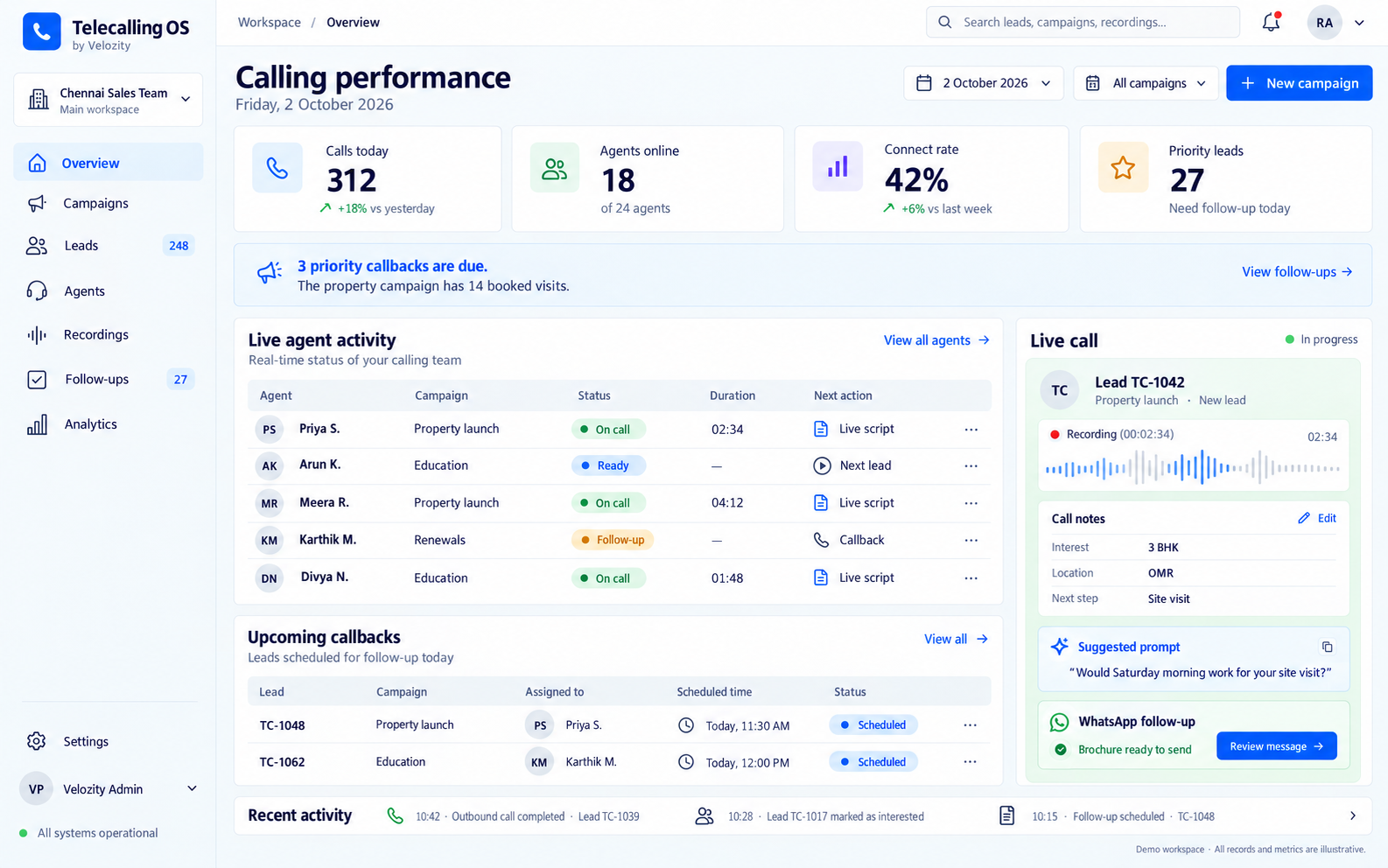
The auto-dialler connects agents to the next best lead automatically. Dynamic call scripts guide conversations based on lead type, previous interactions, and objection handling flows.
Current Call
02:34· Clubhouse + pool · Gated community
· RERA registered: PRM/KA/RERA/XXX
AI scores leads and schedules follow-ups
Every call is logged with disposition, notes, and a lead score updated by AI based on conversation signals. Follow-ups are scheduled automatically via call, SMS, or WhatsApp.
Lead Pipeline
| Lead | Score | Source | Last Action | Next Step |
|---|---|---|---|---|
| VSVikram Sharma | 92 | Site visit booked | Visit 26 Sep | |
| ANAnita Nair | 87 | Website | Callback requested | Call today |
| RPRahul Patel | 78 | Walk-in | Brochure sent | Follow up |
Managers track performance in real time
Live dashboards show calls made, connect rates, average call duration, conversion by agent, and campaign-level metrics. Listen to call recordings for coaching.
Team Performance
| Agent | Status | Calls | Connects | Visits |
|---|---|---|---|---|
| RKRajesh K. | On call | 22 | 11 | 3 |
| PMPriya M. | Ready | 19 | 8 | 2 |
| DVDeepa V. | Break | 15 | 6 | 1 |
What you get.
Predictive auto-dialler
Dials the next lead before the current call ends. Skips busy numbers, DND-listed numbers, and disconnected lines. Agents stay on live conversations, not dial tones.
Auto-Dialler
ActiveDynamic call scripts
Scripts adapt based on lead profile, campaign type, and previous call outcomes. Objection-handling prompts appear in real time. New agents ramp up faster with guided flows.
AI Call Scripts
Context-awareAI lead scoring
Leads are scored automatically based on call outcomes, engagement signals, and demographic fit. The dialler prioritises high-scoring leads so agents focus where conversion is most likely.
Score Breakdown
WhatsApp and SMS follow-ups
Trigger WhatsApp messages, SMS, or email follow-ups automatically after a call. Send brochures, meeting links, or reminders without leaving the platform.
Auto Follow-up
TriggeredWould you like to schedule a site visit?
Book a visit →
Call recording and analytics
Every call is recorded and stored. AI highlights key moments, objections, and commitments. Managers review calls for coaching without sitting in on every conversation.
Recording Library
| Lead | Duration | Sentiment | Keywords | Score |
|---|---|---|---|---|
| VSVikram S. | 4:12 | Positive | 3BHK, site visit | 92 |
| ANAnita N. | 2:45 | Neutral | budget, location | 68 |
| RPRahul P. | 5:30 | Positive | 4BHK, pool | 85 |
CRM integration
Syncs with Salesforce, Zoho CRM, HubSpot, LeadSquared, and custom CRMs. Lead status, call logs, and follow-ups flow both ways without manual data entry.
Connected Platforms
All syncedSalesforce
2-way lead sync
Zoho CRM
2-way lead sync
342 sent today
HubSpot
Contact + deal sync
Watch a quick demo.
Telecalling OS in 60 seconds.
What it looks like in practice.
30-agent telesales team at a real estate developer in Bangalore
The team was dialling manually from mobile phones and spreadsheets. Only 18% of leads were being connected. Agents had no scripts, no follow-up system, and managers relied on self-reported numbers.
Site visit bookings increased by 28% within the first quarter. Managers now coach based on actual call recordings instead of guesswork.
"We went from agents dialling 60 numbers a day to connecting with 120. The WhatsApp follow-up alone recovered leads we would have lost completely." — Two months after deployment.Rajesh Menon, Sales Director, Residential Real Estate Developer
Works with your existing tools.
Enterprise-ready from day one.
Cloud deployment
- SaaS platform — works from any browser
- No hardware or PBX required
- Cloud telephony included
- Scales from 5 to 500 agents
- Mobile app for field teams
Security and compliance
- Call recordings encrypted at rest
- DND registry compliance built in
- Role-based access for agents and managers
- Data hosted in Indian data centres
- TRAI guidelines followed for outbound calling
Clear pricing. No surprises.
Pricing depends on your team size, deployment, and support needs.
Minimum 5 users. Includes auto-dialler, scripts, lead scoring, and WhatsApp follow-ups. Cloud telephony charges extra based on usage. GST extra.
INCLUDES
- Auto-dialler with cloud telephony
- Dynamic call scripts
- AI lead scoring
- WhatsApp and SMS follow-ups
- Call recording and analytics
- CRM integration (one platform)
Built for specific needs.
Good fit
- Real estate sales teams with 5+ calling agents
- Edtech companies running admission or enrollment campaigns
- Insurance and financial services telesales teams
- Any B2C business where outbound calling drives revenue
- Teams currently using personal phones or basic diallers
Not designed for
- Inbound-only call centres (consider a dedicated contact centre solution)
- Teams with fewer than 5 agents (the per-user minimum applies)
- B2B enterprises with long consultative sales cycles and no phone outreach
- Businesses that do not make outbound calls
How much does Telecalling OS cost?+
Pricing starts at ₹1,499 per user per month with a minimum of 5 users. Cloud telephony charges are usage-based and billed separately. GST is extra. Contact us for a detailed quote based on your team size.
How long does setup take?+
Most teams are live within 2-3 business days. This includes CRM integration, script configuration, and agent onboarding. Larger teams with complex CRM setups may take up to a week.
Does it comply with DND and TRAI regulations?+
Yes. The system checks numbers against the NDNC/DND registry before dialling. Calls are placed only during permitted hours as per TRAI guidelines. You can configure additional compliance rules per campaign.
Can agents use it from their mobile phones?+
Yes. The mobile app lets field sales agents make calls, log dispositions, and trigger follow-ups from anywhere. Call recordings and scripts work on mobile as well.
Does it integrate with our existing CRM?+
Telecalling OS integrates with Salesforce, Zoho CRM, HubSpot, LeadSquared, and Freshsales out of the box. Custom CRM integration is available via REST API.
How is call quality handled over the internet?+
Calls are routed through Indian cloud telephony providers with carrier-grade voice quality. The system requires a stable internet connection with at least 1 Mbps per agent. Calls use standard phone lines, not VoIP to the end customer.
Can managers listen to calls in real time?+
Yes. Managers can barge in, whisper, or silently monitor any live call. All calls are also recorded for post-call review and coaching.
What reporting is available?+
Dashboards show calls made, connect rate, average talk time, disposition breakdown, conversion rate, and agent-level rankings. Reports can be exported as CSV or PDF. Custom reports are available on request.
Related guides.
AI call recording for sales teams
How AI-powered call recording improves coaching and conversion.
Read the guideDesigning useful voice agents
Principles for building voice-based AI that people actually use.
Read the guideHow to choose your first AI workflow
A practical way to move from ideas to a first project.
Read the guideTelecalling OS.
Let's set it up.
Book a 20-minute demo, get a quote, or just ask a question.
Our team in Chennai responds within one working day.