
Construction management
that keeps projects on track.
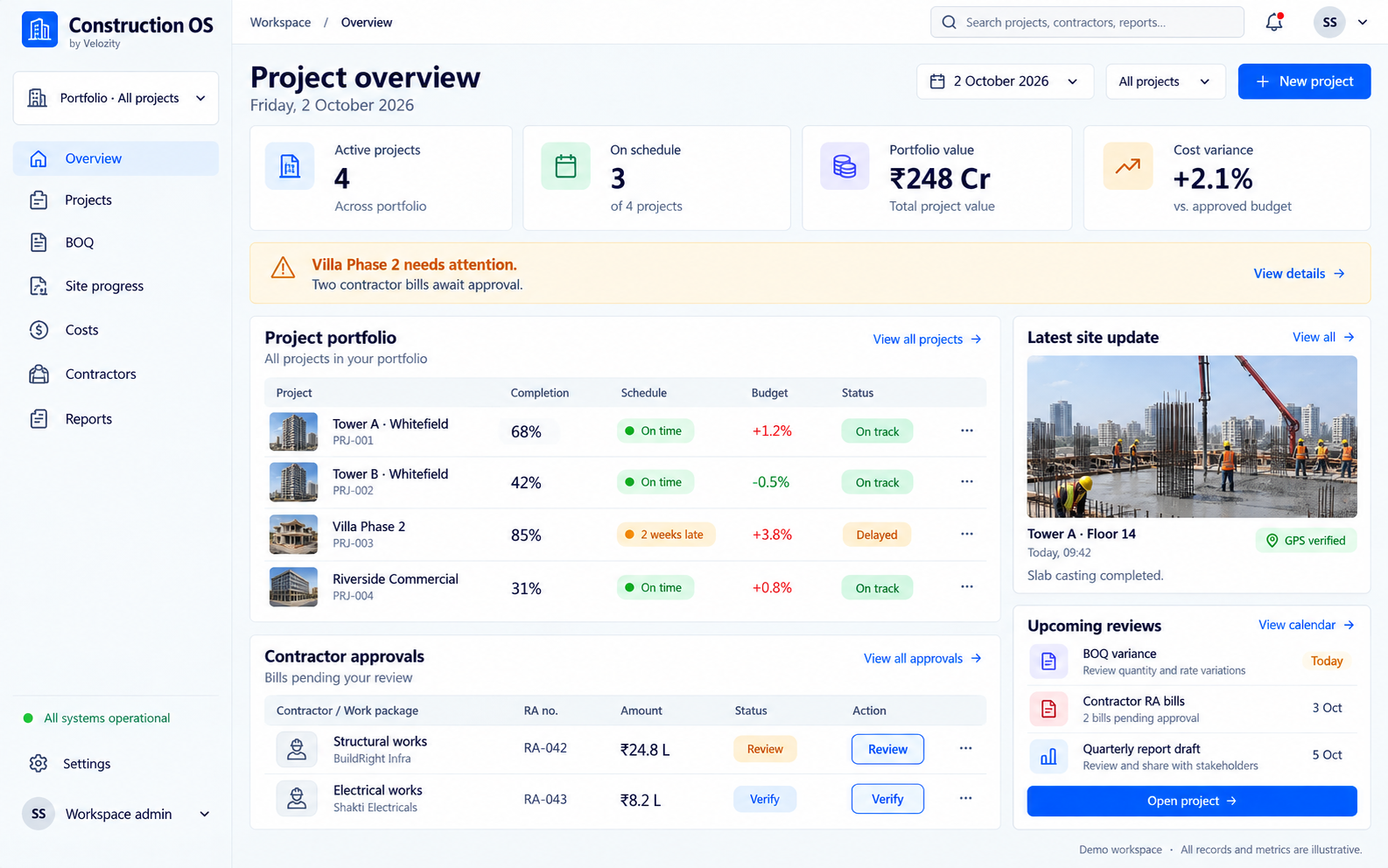
A project management platform built for Indian construction. Track BOQs, monitor site progress with photo logs, manage contractor payments against milestones, generate RERA reports, and see all your projects on one dashboard.
What you are dealing with today.
Budget overruns are discovered too late
Actual costs are compared to estimates only at month-end. By then, a 10% overrun on RCC work has already happened. There is no real-time visibility into spending versus budget at the activity level.
Progress tracking depends on site engineer reports
Site engineers send WhatsApp photos and verbal updates. There is no standardised way to measure percentage completion or compare planned versus actual progress across activities.
Contractor billing is a manual reconciliation exercise
Running account bills are prepared in Excel, cross-checked against BOQ rates, adjusted for deductions, and sent for multi-level approval. Each cycle takes days and often contains errors.
From setup to results.
Set up projects with BOQ and schedules
Import your bill of quantities, define activity schedules, assign contractors, and set budget baselines. Construction OS supports residential, commercial, and infrastructure project structures.
Bill of Quantities
Import BOQ| Item | Unit | Rate | Qty | Amount | Variance |
|---|---|---|---|---|---|
| RMC M30 | m³ | ₹5,200 | 1,200 | ₹62.4L | +2% |
| TMT Fe500D | MT | ₹52,400 | 180 | ₹94.3L | On budget |
| Brickwork | m² | ₹280 | 8,400 | ₹23.5L | -1% |
| Electrical | LS | — | — | ₹18.2L | On budget |
Site teams log progress from mobile
Engineers update activity completion, upload geo-tagged photos, and flag issues from the mobile app. Updates are timestamped and linked to the relevant BOQ item and floor.
Daily Log — Tower A
Updated| Activity | Planned | Actual | Variance |
|---|---|---|---|
| Slab casting — F14 | 24 Sep | 24 Sep | On time |
| Column work — F15 | 26 Sep | — | Upcoming |
Track costs and contractor payments in real time
Every material indent, purchase order, and contractor bill is linked to a BOQ activity. The dashboard shows budget consumed versus budget remaining at the activity, floor, and project level.
Cost Tracker — Live
Tower A| Category | Budget | Spent | Remaining |
|---|---|---|---|
| Materials | ₹38 Cr | ₹26.2 Cr | ₹11.8 Cr |
| Labour | ₹22 Cr | ₹14.8 Cr | ₹7.2 Cr |
| Contractor | ₹18 Cr | ₹12.4 Cr | ₹5.6 Cr |
Generate reports for management and RERA
One-click reports for internal MIS, investor updates, and RERA quarterly submissions. Project timelines, cost summaries, and completion percentages are always current.
Report Generator
Generate| Report | Type | Last Generated | Status |
|---|---|---|---|
| RERA QPR | Quarterly | Q2 2026 | Due 30 Sep |
| Cost Variance | Monthly | Aug 2026 | Ready |
| Progress Report | Weekly | 22 Sep | Ready |
| Contractor RA Bill | On demand | 24 Sep | Generated |
What you get.
BOQ management with rate analysis
Import and manage detailed bills of quantities. Link BOQ items to activities, contractors, and cost centres. Rate analysis helps validate contractor quotes against market benchmarks.
Rate Comparison
| Material | Market Rate | Our Rate | Savings |
|---|---|---|---|
| RMC M30 | ₹5,400/m³ | ₹5,200/m³ | 3.7% |
| TMT Fe500D | ₹54,000/MT | ₹52,400/MT | 3.0% |
Site progress tracking with photo logs
Geo-tagged, timestamped photo logs linked to specific activities and floors. Compare planned versus actual progress visually. Flag delays before they cascade.
Daily Progress
Real-time cost tracking
Every cost is mapped to a BOQ activity. Material indents, purchase orders, and contractor bills update the budget tracker in real time. Alerts trigger when costs exceed thresholds.
Budget Health
Contractor and subcontractor management
Onboard contractors, define work orders against BOQ items, track milestone completion, and process running account bills. Deductions for advances, retention, and penalties are calculated automatically.
Active Contractors
| Contractor | Work | RA Bill | Status |
|---|---|---|---|
| ABC Constructions | Structural | ₹8.4 Cr | Active |
| XYZ Electrical | MEP | ₹4.2 Cr | Active |
RERA reporting
Track project milestones required for RERA quarterly updates. Generate reports in the format required by your state RERA authority. Keep project registration data and timelines audit-ready.
RERA Status
Multi-project dashboard
See all your projects on one screen. Compare progress, budgets, and timelines. Drill down into any project, building, floor, or activity for detail.
Portfolio View
| Project | Progress | Budget | Status |
|---|---|---|---|
| Tower A | 68% | +1.2% | On Track |
| Tower B | 42% | -0.5% | On Track |
| Villa Ph2 | 85% | +3.8% | Delayed |
Watch a quick demo.
Construction OS in 60 seconds.
What it looks like in practice.
Mid-size construction firm in Ahmedabad with 6 concurrent residential projects
The firm was experiencing budget overruns averaging 18% across projects. Cost data was compiled monthly in Excel, making it impossible to catch overruns in time. Contractor billing cycles took 8 to 10 days per cycle due to manual reconciliation.
After deploying Construction OS, every cost was linked to a BOQ activity in real time. Budget alerts flagged overruns at the activity level before they compounded. Contractor billing cycles dropped from 10 days to 3 days. The firm now has real-time visibility across all 6 sites from one dashboard.
"We used to find out about cost overruns at month-end when it was too late to act. Now we see every rupee against the BOQ in real time. Our budget variance has come down from 18% to under 5% across all projects." — Precision that compounds across projects.Mehul Patel, Director of Projects, Construction Firm
Works with your existing tools.
Enterprise-ready from day one.
Cloud deployment
- SaaS platform with browser and mobile access
- Multi-project, multi-site support
- Automatic backups and updates
- Offline-capable mobile app for site teams
- Go-live in under 3 weeks
Security and data
- Data hosted in Indian data centres
- Role-based access for site engineers, project managers, and directors
- Audit trail on all cost and progress entries
- Document storage with version control
- Daily automated backups with 90-day retention
Clear pricing. No surprises.
Pricing depends on your team size, deployment, and support needs.
Per-project pricing. Volume discounts for 5+ projects. GST extra.
INCLUDES
- Unlimited users per project
- BOQ management and cost tracking
- Mobile app for site teams
- Contractor billing and payments
- RERA reporting module
- Email and phone support
Built for specific needs.
Good fit
- Mid-size builders handling 3 or more concurrent projects
- Developers with budget overrun problems they cannot trace
- Construction firms with multiple contractors per project
- Builders who need RERA quarterly reporting
- Project management teams still using Excel for BOQ tracking
Not designed for
- Individual home construction (designed for commercial-scale projects)
- Infrastructure-only contractors with no building component
- Firms looking only for architectural design software
- Single-project builders with under 20 activities
Can we import our existing BOQ from Excel?+
Yes. Construction OS supports BOQ import from Excel and CSV. The system maps columns to activities, rates, quantities, and units. Manual adjustment is available after import.
Does it work offline on construction sites?+
Yes. The mobile app works offline for progress updates and photo uploads. Data syncs automatically when the device reconnects to the internet.
How does contractor billing work?+
Create work orders against BOQ items, define milestones, and track completion. Running account bills are generated based on measured progress. Deductions for advances, retention, TDS, and penalties are applied automatically.
Can we use it for both residential and commercial projects?+
Yes. The project structure is flexible. You can define buildings, floors, units, or zones depending on your project type.
Does it integrate with Tally?+
Yes. Contractor payments and material purchase data can be synced with Tally ERP. This avoids double entry and keeps your accounts current.
Does it connect with your real estate CRM?+
Yes. Construction OS integrates with our RealEstate OS CRM. Sales data on bookings and unit status flows into the construction dashboard, giving project managers visibility into sold versus unsold inventory.
How is pricing structured for multiple projects?+
Pricing is per project per month. Volume discounts apply for 5 or more active projects. Completed projects can be archived at no additional cost. Contact us for a custom quote.
What RERA states are supported?+
Construction OS generates reports compatible with MahaRERA, RERA Gujarat, RERA Karnataka, TNRERA, and UP-RERA formats. Other states can be added based on your requirements.
Related guides.
AI for construction site tracking and compliance
How AI and mobile tools improve site progress monitoring.
Read the guideAI in Indian real estate operations
How AI is reshaping lead management and sales for Indian developers.
Read the guideHow to choose your first AI workflow
A practical way to move from ideas to a first project.
Read the guideLooking for pricing and comparisons? See our detailed guide: Construction Management Software India
Construction OS.
Let's set it up.
Book a 20-minute demo, get a quote, or just ask a question.
Our team in Chennai responds within one working day.